> ## Documentation Index
> Fetch the complete documentation index at: https://lightdash-mintlify-9d2ee1df.mintlify.site/llms.txt
> Use this file to discover all available pages before exploring further.
# Running total
> Running totals give you the sum of a value + all of the previous values in that column.
[Just gimme the code! ](#here’s-the-sql-you-can-copy-paste-to-calculate-a-running-total)
Here's an example of a running total:
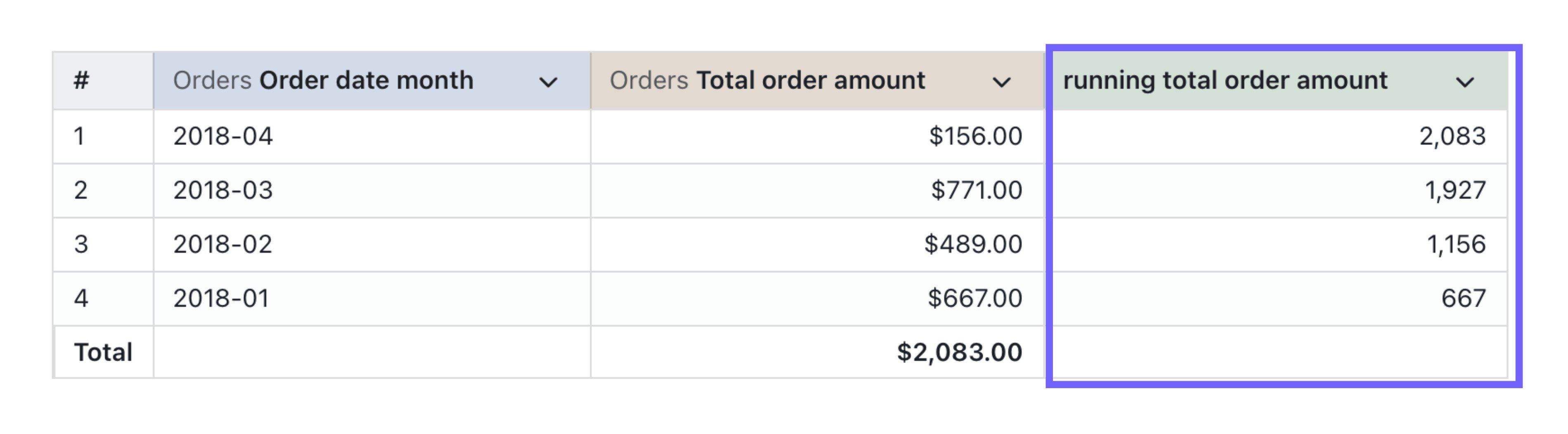 And here's the SQL used in the table calculation:
```sql theme={null}
SUM(${orders.total_order_amount}) OVER (
ORDER BY
${orders.order_date_month}
ROWS BETWEEN UNBOUNDED PRECEDING AND CURRENT ROW
)
```
In general, the SQL used for calculating running totals has two bits (with an optional third bit):
* `column_I_want_to_sum` - this is the column with the values you want to add up
* `column_I_want_to_order_by` - this is the column you want to order your running total over
* `optional_other_column_I_want_to_order_by` - this column is optional and you can add as many more `order by` columns as you need. For your running total to only go up an increment of one row, you'll need to add every dimension in your results table to the `ORDER BY` bit in your SQL. And, the order of these will need to be the same as the ordering you've added to the columns in your results table.
### Here's the SQL you can copy-paste to calculate a running total
```sql theme={null}
SUM(${table.column_I_want_to_sum}) OVER (
ORDER BY
${table.column_I_want_to_order_by},
${table.optional_other_column_I_want_to_order_by}
ROWS BETWEEN UNBOUNDED PRECEDING AND CURRENT ROW
)
```
**💎 Level up your SQL**:
* You can specify if you want to order your columns in ascending order (1, 2, 3, 4) or descending order (4, 3, 2, 1) using the key words `ASC` and `DESC` in your `ORDER BY` clause. By default, a column will be ordered in ascending order - so if you want it ordered ascending, you don't need to add anything.
```sql theme={null}
SUM(${table.column_I_want_to_sum}) OVER (
ORDER BY
${table.column_I_want_to_order_by} ASC,
${table.optional_other_column_I_want_to_order_by} DESC
ROWS BETWEEN UNBOUNDED PRECEDING AND CURRENT ROW
)
```
And here's the SQL used in the table calculation:
```sql theme={null}
SUM(${orders.total_order_amount}) OVER (
ORDER BY
${orders.order_date_month}
ROWS BETWEEN UNBOUNDED PRECEDING AND CURRENT ROW
)
```
In general, the SQL used for calculating running totals has two bits (with an optional third bit):
* `column_I_want_to_sum` - this is the column with the values you want to add up
* `column_I_want_to_order_by` - this is the column you want to order your running total over
* `optional_other_column_I_want_to_order_by` - this column is optional and you can add as many more `order by` columns as you need. For your running total to only go up an increment of one row, you'll need to add every dimension in your results table to the `ORDER BY` bit in your SQL. And, the order of these will need to be the same as the ordering you've added to the columns in your results table.
### Here's the SQL you can copy-paste to calculate a running total
```sql theme={null}
SUM(${table.column_I_want_to_sum}) OVER (
ORDER BY
${table.column_I_want_to_order_by},
${table.optional_other_column_I_want_to_order_by}
ROWS BETWEEN UNBOUNDED PRECEDING AND CURRENT ROW
)
```
**💎 Level up your SQL**:
* You can specify if you want to order your columns in ascending order (1, 2, 3, 4) or descending order (4, 3, 2, 1) using the key words `ASC` and `DESC` in your `ORDER BY` clause. By default, a column will be ordered in ascending order - so if you want it ordered ascending, you don't need to add anything.
```sql theme={null}
SUM(${table.column_I_want_to_sum}) OVER (
ORDER BY
${table.column_I_want_to_order_by} ASC,
${table.optional_other_column_I_want_to_order_by} DESC
ROWS BETWEEN UNBOUNDED PRECEDING AND CURRENT ROW
)
```